
On August 25, 2026, OpenAI shipped WebMCP support in ChatGPT Desktop. It changes how AI assistants interact with websites: instead of scraping raw HTML and guessing at answers, they call structured tools you control and get your actual content. Here's what it means for your site, in plain English, with no code required to set it up.
What WebMCP actually is
WebMCP is a browser API. Specifically, it lets a web page register a set of callable tools on an object called document.modelContext. AI assistants that run inside a browser, like ChatGPT Desktop, can discover those tools and call them directly, rather than reading and parsing the page's raw HTML.
Think of it this way. A scraper reads your page the way someone reads a printed word document: it takes what it can see, in order, and tries to figure out what's useful. A WebMCP-aware AI assistant calls a structured function: "Does this site have a vegan leather belt? Give me the answer." Your site returns exactly that, from your indexed content, in a format the AI can use without interpretation.
The AI gets a better answer. The human gets a correct response. And you, for the first time, get a log of what was asked.
The MCP part: MCP stands for Model Context Protocol, the open standard Anthropic published in late 2024 for connecting AI models to external tools. WebMCP is its browser-native extension, letting websites participate in that ecosystem without a server-side integration. It was designed by OpenAI and adopted across the industry rapidly in 2026.
What changed on August 25, 2026
Before that date, every AI assistant that visited your website did the same thing: it fetched the page HTML, read it, and tried to extract useful information. That process has three problems.
Without WebMCP
- AI reads raw HTML and guesses at meaning
- Outdated or cached content produces stale answers
- Ambiguous product descriptions become hallucinations
- No record of what was asked or answered
- No way to know if the agent found what it needed
- Nothing in GA4 attributes the visit to AI
With WebMCP
- AI calls a structured tool with a precise question
- Your live indexed content answers it directly
- Structured output, no interpretation required
- Every query is logged in your analytics
- You see no-answer rates and content gaps
- AI traffic is its own channel, not lost in "Direct"
The shift is not just technical. An AI that scrapes your page and misunderstands a product description tells 1.1 billion monthly ChatGPT users the wrong thing about your brand. An AI that calls your WebMCP tools and gets your actual answer tells them the right thing, from your content, every time.
Without WebMCP
User asks ChatGPT: "Do you ship to Italy?"
ChatGPT fetches your homepage HTML
Guesses from footer text and meta tags
Returns answer that may or may not be correct
Visit logged as "Direct" in GA4
With WebMCP
User asks ChatGPT: "Do you ship to Italy?"
ChatGPT calls ask_site("Do you ship to Italy?")
Your indexed knowledge base returns the answer
ChatGPT returns your exact policy to the user
Query logged in AskVio as an AI agent event
The three tools your site registers
When WebMCP is enabled on your site, three tools are registered on document.modelContext. AI assistants see them, choose the right one, and call it. You don't manage that choice. The assistant does.
ask_site: the main question tool
Takes a natural-language question and returns the best answer from your indexed content. This is what an AI calls when a user asks something specific about your brand, products, or policies.
search_site: the page discovery tool
Returns a ranked list of relevant pages and their URLs. Used when an AI wants to point a user to a specific page rather than summarize an answer itself. Think of it as your sitemap, but smart.
get_source: the page content tool
Retrieves the full indexed text for a specific page URL. Used when an AI already knows which page it wants to read and needs the content in a clean, structured format, not raw HTML.
You control which tools are active. ask_site and search_site are toggles in your dashboard. get_source is always enabled when WebMCP is on. All three return only content from your indexed knowledge base: no private pages, no authenticated areas, nothing you haven't explicitly included in your AskVio index.
Which AI clients support it right now
| Client | Status | What you need | Notes |
|---|---|---|---|
| ChatGPT Desktop | Ready | Just enable WebMCP in AskVio | No origin trial, no extra setup. Primary recommended client. |
| Brave Leo | Beta | Just enable WebMCP in AskVio | Experimental support. Works in current Brave builds. |
| Chrome 149+ | Origin trial | Register at Chrome Origin Trials, add token to site headers | Requires the site owner to enroll separately. AskVio docs cover this. |
| Edge 150+ | Origin trial | Register at Edge Origin Trials, add token to site headers | Same process as Chrome. Separate trial enrollment. |
| Claude (web) | Not yet | No action needed now | Standard browser tabs don't load page-defined WebMCP tools yet. |
| Perplexity | Not yet | No action needed now | Currently scrapes pages. WebMCP roadmap not announced. |
ChatGPT Desktop is the one that matters most right now. It accounts for 74.78% of attributed AI referral traffic and needs zero additional setup on your end. The origin-trial path for Chrome and Edge is a few extra steps, but AskVio walks you through it in the docs if you want coverage there too.
The standard browser caveat: WebMCP tools only fire when the AI assistant has native support for the API. Normal ChatGPT, Claude, and Perplexity tabs don't have that yet. The primary audience today is ChatGPT Desktop users, which already numbers in the hundreds of millions.
Why this matters for your business
Two things happen when your site doesn't have WebMCP and a ChatGPT user asks about your brand.
First, the AI scrapes what it can find and constructs an answer. If your shipping policy page is buried in a footer, if your product descriptions are ambiguous, or if your site has any outdated content anywhere, the AI uses that. It doesn't know it's outdated. It doesn't know it's ambiguous. It answers with whatever it found.
Second, no record of that query exists anywhere in your systems. The visit may appear in your server logs, but it surfaces in GA4 as a direct session, indistinguishable from a person who typed your URL from memory.
The conversion rate is the data point that should stop you. Ahrefs found that AI-referred traffic converts 23 times better than organic search. That's not a rounding error. It's a structurally different kind of visitor. Someone who asks ChatGPT a specific question about your product and then clicks through has already done their research. They want to verify one thing and then buy.
If ChatGPT gets a question about your site wrong because it was scraping from an outdated page, you lose that sale. With WebMCP, ChatGPT gets the right answer, from you, every time. And you find out what was asked.
"The question an AI agent asked on behalf of a human is the highest-signal buyer intent data you will ever see. It's explicit, specific, and timestamped. WebMCP is the first mechanism that lets you capture it."
How to enable it (no developer required)
If you already have the AskVio widget script on your site, you need to do exactly one thing to enable WebMCP: toggle it on in your dashboard. No code changes, no new script tags, no developer sprint.
Open Security settings in AskVio
Go to your AskVio dashboard and navigate to Security. You'll see an "AI Agent Access" section. This is where WebMCP lives.
Toggle Enable WebMCP on
Flip the switch. AskVio will generate a signed, origin-bound token for your site automatically. No manual token management.
Add your site origin to the allowlist
Enter the exact HTTPS origin where your widget is installed: https://www.yoursite.com. This limits WebMCP tools to requests coming from your domain only. No wildcards.
Choose which tools to expose
Ask questions (ask_site) and Search knowledge (search_site) are on by default. get_source is always available when WebMCP is enabled. You can turn any of these off at any time, instantly, without touching your site code.
Save. Done.
Changes take effect immediately. No republish required, no cache to clear. Open ChatGPT Desktop, visit your own site, and ask it a question. You'll see the tool call in your AskVio analytics within seconds.
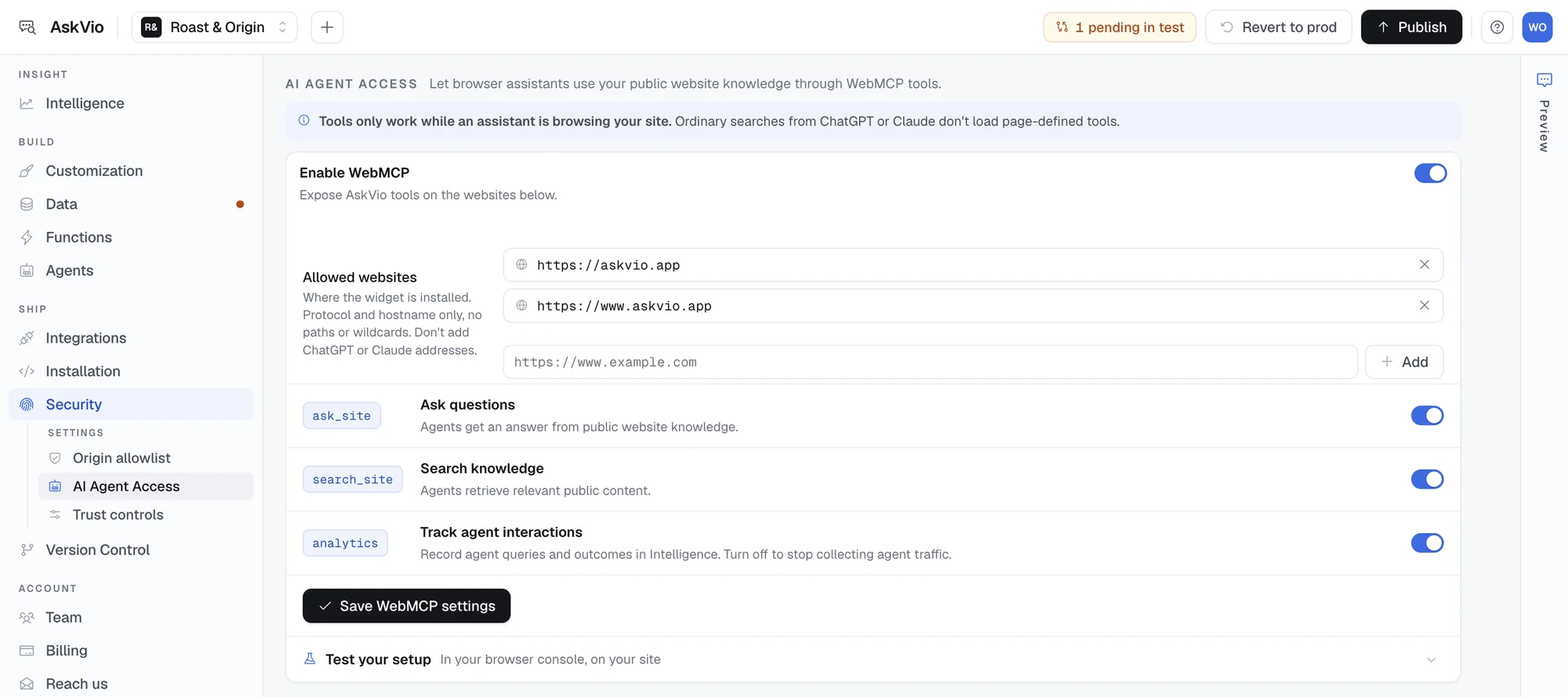
The WebMCP toggle in AskVio's Security settings. One switch, immediate effect, no code changes.
If you're not on AskVio yet: Setting up the widget takes around five minutes. You paste a single script tag into your site's <head>. After that, the WebMCP setup above is a further 60 seconds. The full process, from no AskVio account to live WebMCP registration, is under 10 minutes.
What you get in analytics
Every WebMCP tool call is logged as a separate analytics event. Not lumped into your widget traffic. Not buried in "Direct." Its own channel, with its own numbers.
In the AskVio dashboard under Analytics, the AI Agent Traffic section shows:
- Total queries this period and trend vs. last period
- No-answer rate: the percentage of queries your site couldn't answer
- Top questions, sorted by volume
- Channel breakdown (ChatGPT Desktop, Brave, Chrome origin trial)
- Top intents: what category of question agents are asking most
- Top source pages referenced in answers
The no-answer rate is the number to watch. It represents queries where an AI agent came to your site with a specific question and your indexed content couldn't provide an answer. Each one is a buyer who got an incomplete response.
When you see the same question appearing in the no-answer list repeatedly, you know exactly what content to write. Not what you think users want to know. What they actually asked, word for word, through an AI assistant, with explicit purchase intent behind it.
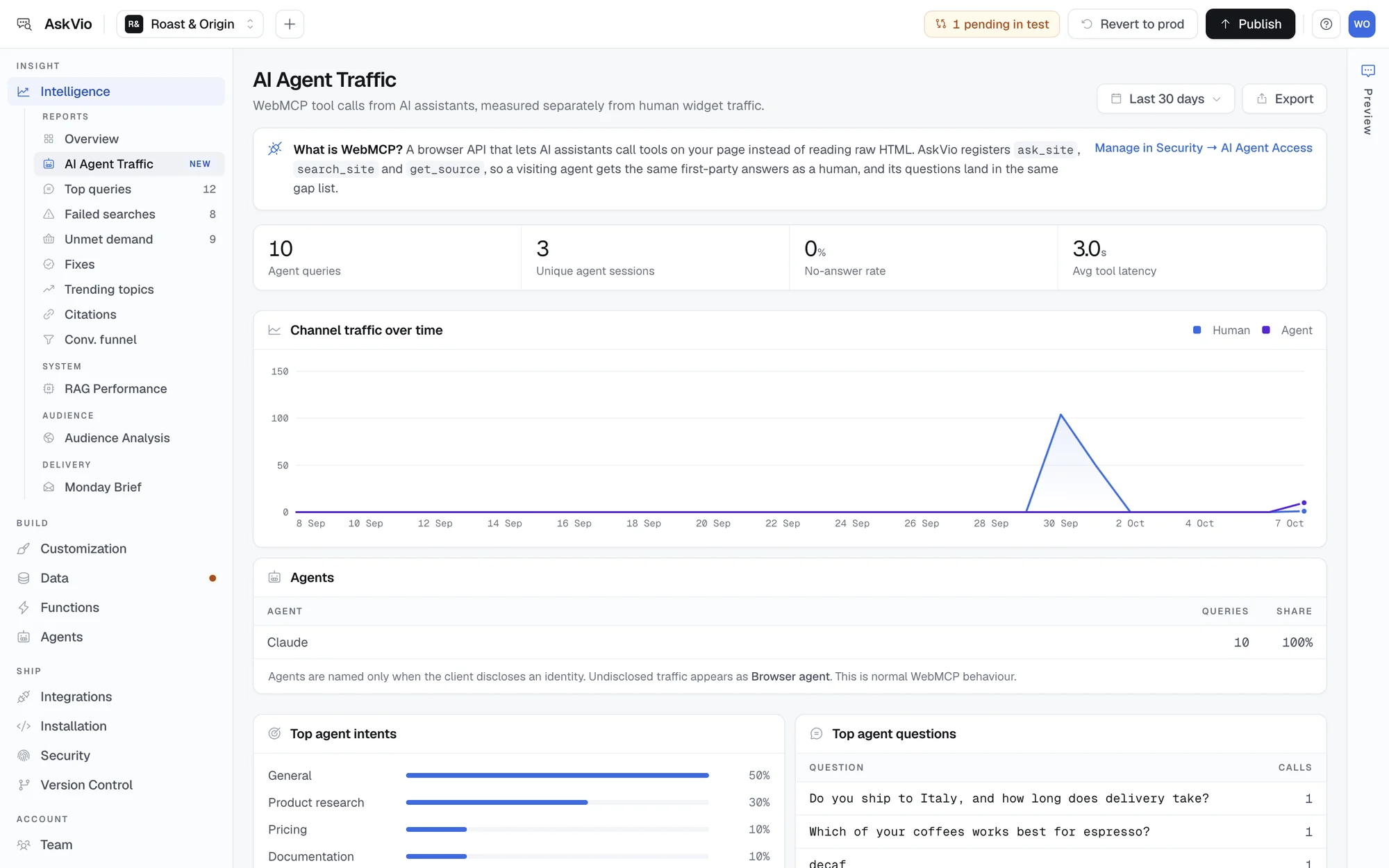
The AI Agent Traffic report: agent queries, no-answer rate and latency, human and agent traffic side by side, and which assistants called your tools.
If you have Google Tag Manager on your site, AskVio pushes four events to window.dataLayer during a WebMCP session: askvio_agent_query, askvio_agent_search, askvio_agent_no_answer, and askvio_agent_query_error. You can forward these to GA4 as custom events and build your own reports there, alongside your human traffic data.
That's the end state: one analytics dashboard with human widget queries and AI agent queries side by side, sourced from the same knowledge index, attributed correctly, and comparable by conversion rate. Not two separate systems. Not "Direct" traffic you can't explain. A clear picture of how people, and the AI assistants they use, interact with your site's content.
Enable WebMCP in under 10 minutes
AskVio indexes your content, registers your WebMCP tools for ChatGPT Desktop, and shows you every agent query in your dashboard. One toggle, no developer required.
Sources
- OpenAI. ChatGPT Desktop WebMCP support shipped August 25, 2026.
- OpenAI. ChatGPT Monthly Active Users: 1.1 billion (June 2026 announcement).
- Anthropic. Model Context Protocol specification, November 2024. Open standard for AI-to-tool communication.
- higoodie.com. 2026 AI Search Traffic Report. ChatGPT: 74.78% of attributed AI referral traffic.
- Ahrefs. Internal referral traffic study. AI search: approx. 0.5% of visits, 12.1% of sign-ups (23x conversion rate). 2026.
- Loamly. AI Traffic Attribution Study. 70.6% of confirmed AI-source visits arrived without referrer headers. 2026.
- HUMAN Security. Bot Baseline Report. AI agent-driven traffic grew 7,851% year-over-year in 2025.
- Google Chrome Developers. WebMCP Origin Trial. developer.chrome.com/origintrials.
- AskVio Docs. WebMCP: AI Agent Access. Technical reference for setup, tools, and security.