
GA4 tracks what your visitors do: pages viewed, events fired, conversions recorded. It cannot track what they wanted but could not get. That gap has a name — Failed Intent Rate — and for anyone who cares about measurement accuracy, it is the most important number that no standard analytics stack currently surfaces.
The gap in your analytics stack
The standard web analytics funnel is built on behavioral signals. A user arrives, clicks, scrolls, fills a form, and exits. Every one of those actions leaves a trace. GA4 captures it, processes it into events, builds it into funnels, and hands it back to you as a dashboard.
But there is an entire category of user experience that behavioral signals cannot represent: what a visitor wanted and could not find.
Consider four users who arrive on an e-commerce homepage and bounce after 45 seconds. From a GA4 perspective they are identical — four sessions, four exits, zero conversions.
Each represents a different problem with a different fix. User A is a navigation problem. User B is a catalog gap. User C is a content gap. The bounce rate tells you none of this. GA4 records the exit but is blind to the intent that preceded it.
This is not a GA4 limitation specifically — it is a structural limitation of behavioral analytics. The entire paradigm is built on observing actions, not understanding desires. Failed Intent Rate is the metric that starts to close that gap.
Defining Failed Intent Rate
Failed Intent Rate (FIR) is the percentage of user interactions in which a visitor expressed a need — through a direct question, a product search, or a conversational query — and received either no useful response or a response below a meaningful confidence threshold.
The metric has two independent components, worth tracking separately because the remediation path is different for each.
- Content FIR — the AI returned an answer, but with low confidence. The content exists (or partially exists) on your site, but not well enough for the AI to answer with certainty. Root cause: incomplete documentation, outdated copy, missing FAQs.
- Catalog FIR — the user asked for a product or category that produced no match in your indexed catalog. The content does not exist because the product does not exist. Root cause: catalog gaps, missing SKUs, or a product line not yet launched.
The combined FIR gives you a single number to track over time. The split gives you two separate action queues.
Important distinction: FIR is not the same as bounce rate, exit rate, or task completion rate. Those metrics measure behavior after the fact. FIR measures the success or failure of an intent expressed in natural language — the most direct signal of user desire available.
Why GA4 structurally cannot measure it
This is worth dwelling on, because many practitioners assume the answer is somewhere in their current stack if they just look hard enough. It is not, and here is why.
GA4 is built on behavioral events
GA4's data model is event-based. Every data point is an action a user took: page_view, scroll, click, purchase. What it cannot capture is the cognitive state that preceded the action. When a user bounces from a product page, GA4 records the exit event. It does not record "user was looking for size XL and it was not available."
Site search only covers search-bar interactions
GA4's internal site search tracking (view_search_results) captures queries typed into a traditional site search bar. This covers one interaction mode out of many. It misses users who asked a support chatbot, navigated via category menus, used product filters, or simply read product descriptions and left. Even for users who do use site search, GA4 shows you the query but not the outcome — "did the search return a useful result?" is not a GA4 measurement.
Zero-party intent data is not in the behavioral layer
The most accurate signal of user intent is the user stating their intent in their own words. A conversational query — "do you have a winter jacket in XL for under €100?" — contains product type, size, season, and price range in a single sentence. No behavioral event captures this level of specificity.
| Capability | GA4 + Site Search | Heatmaps | Exit Surveys | AI Chat + FIR |
|---|---|---|---|---|
| Records user behavior | Yes | Yes | Partial | Yes |
| Captures user intent in natural language | No | No | Partial (open-field) | Yes |
| Identifies content gaps specifically | No | No | Qualitative only | Yes, with clusters |
| Identifies catalog gaps specifically | No | No | No | Yes, with similarity scores |
| Runs continuously without user recruitment | Yes | Yes | No | Yes |
| Quantified as a rate over time | Exit rate only | No | No | Yes — FIR |
| First-party, cookieless | Partial | Requires JS tracking | Yes | Yes |
GA4 and FIR measure fundamentally different things and are therefore complementary, not competitive. You need both.
The three types of failed intent
Once you start collecting FIR data, you will find that failed queries cluster into three distinct categories. Treating them as a single bucket obscures the different actions required.
The answer exists but isn't documented
Your return policy is real. Your shipping terms exist. But the AI could not find it because the information is buried in a PDF, missing from the help center, or on a page the crawler has not indexed yet.
The product does not exist in your range
The user is asking for something you do not carry. The AI searched your indexed product catalog and found nothing with sufficient similarity. This is real demand signal for a product you do not yet sell.
Content exists but is too thin to answer well
Your documentation covers the topic at a surface level but lacks the detail needed for a confident answer. The AI found partial matches but cannot synthesize a complete response.
Content Gap: write and publish the missing content
Add a FAQ entry, publish a help center article, or update your returns page. Once the content exists, trigger a recrawl in AskVio. The confidence score for that query cluster will rise. Typically resolved within 48 hours of publishing.
Catalog Gap: escalate to merchandising
This is a business intelligence signal, not a content task. The query data — including how many distinct visitors asked, the frequency, and the closest existing match — should be handed directly to the product or buying team.
Confidence Gap: expand and deepen existing content
Find the existing page or section that partially answers the query. Add more detail, a structured FAQ block, examples. Thin content that surfaces at mid-confidence is almost always more valuable to improve than starting from scratch.
Benchmarks: what does a healthy FIR look like?
FIR is a relatively new metric, and industry-wide benchmarks are still forming. The following ranges are a practical starting point based on patterns across AskVio-powered sites.
| FIR Range | Status | Typical cause | Priority action |
|---|---|---|---|
| < 10% | Excellent | Well-documented site, comprehensive catalog, active content maintenance | Monitor for emerging gaps via Trending Topics |
| 10% – 25% | Good | Most content covered, some thin areas or seasonal catalog gaps | Work through the top-10 failed query clusters — quick wins available |
| 25% – 45% | Needs work | Large content surface with patchy coverage, or a catalog that changes faster than docs are updated | Prioritise by volume. Content gaps are fastest to fix. |
| > 45% | Critical | Widget deployed on a site with insufficient crawl coverage, or poor structured data | Review crawl depth and scope first. Increase crawled pages, re-index, check excluded pages. |
Important context: FIR is sensitive to the confidence threshold you set. A lower threshold means more queries are flagged as "low confidence" — which raises your FIR number but gives you more granular signal. AskVio's default threshold is calibrated to flag answers below 50% confidence. Adjust it in Data → Answer trust controls in your dashboard if your use case demands a tighter or looser definition.
FIR and conversion rate: the relationship
FIR is a leading indicator of conversion rate, not a lagging one. When a user's intent fails, the most likely outcome is an exit — and exits that follow a failed intent are qualitatively different from exits that follow satisfied browsing. The user was actively trying to convert, found a blocker, and left. A 10-point reduction in FIR translates to fewer exits at high-intent moments. GA4 will register the conversion lift. FIR explains why.
Reading FIR in AskVio's analytics dashboard
AskVio surfaces FIR data across four reports in the Intelligence section of your dashboard. Here is how each report maps to the metric.
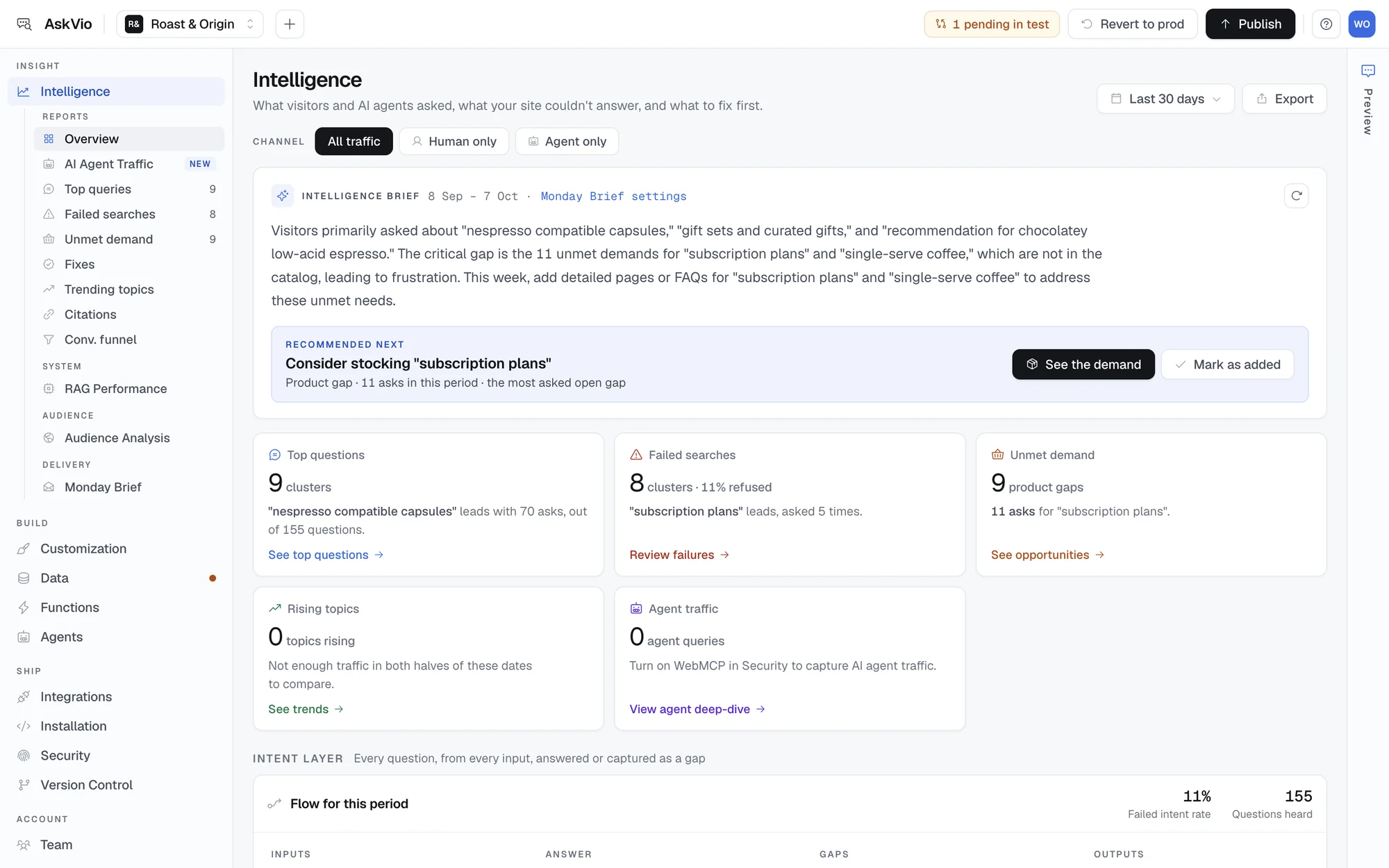
The Intelligence overview: the brief, the one fix recommended next, and the insight cards.
The Overview — Intelligence Brief and insight cards
When you open Intelligence, the first thing you see is the Intelligence Brief — an AI-generated paragraph that summarises your period's intent data in plain language. It reads something like: "This week, 12% of queries received low-confidence answers. The top cluster was 'delivery time for rural areas', asked 28 times. Your catalog returned zero matches for 'waterproof trail shoes', asked 17 times by 14 distinct visitors."
Below the brief, a recommended next fix and the insight cards give you at-a-glance FIR numbers: Failed searches (Content FIR), Unmet demand (Catalog FIR), Top queries (the full volume picture), and Rising topics (week-on-week topic momentum to catch new FIR clusters early).
Failed Searches — the Content FIR table
The Failed Searches report shows every question cluster your content could not answer, ranked by frequency, with your overall Failed intent rate at the top. Each row shows the cluster (semantically grouped), whether it is a content gap or a product gap, how many times it was asked, when it was last seen, and the action to take: add an answer, evaluate the product, or mark it fixed.
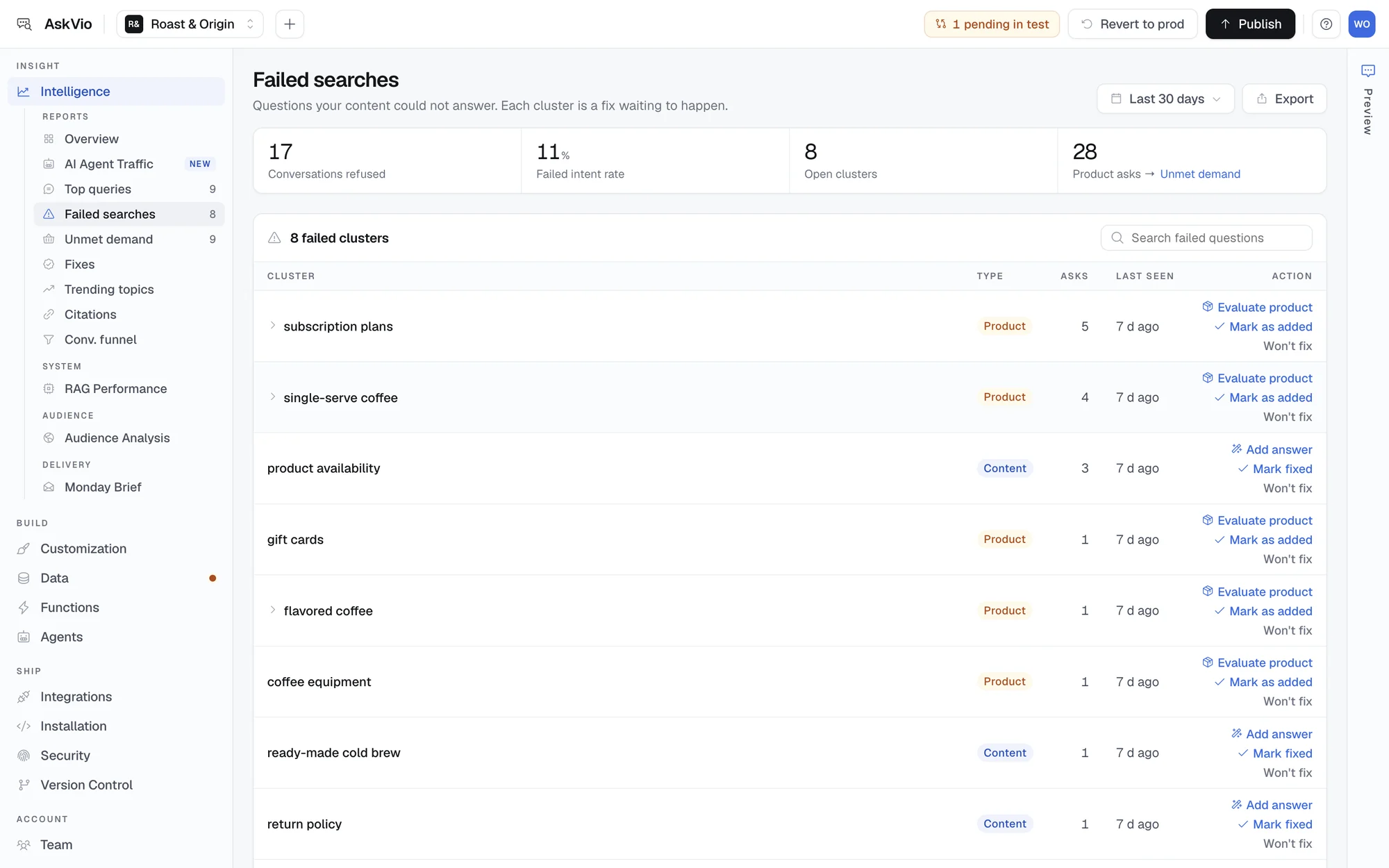
Failed searches: each cluster is typed as a content or product gap, with the action that closes it.
A note on clustering: AskVio groups semantically similar queries into a single row rather than showing every individual phrasing. "Can I return sale items", "return policy sale products", and "are discounted items returnable" appear as one cluster. Write one FAQ, fix all three phrasings at once.
Unmet Demand — the Catalog FIR cards
The Unmet Demand report uses a card layout. Each card shows a product or option visitors asked for that your catalog doesn't carry, how many times it was asked, when it was last asked, and whether the same request also shows up in Failed Searches. With "Notify me" switched on, the widget offers to email the visitor if you add it, so each card also counts the people waiting. The top cards are the most commercially significant FIR signals.
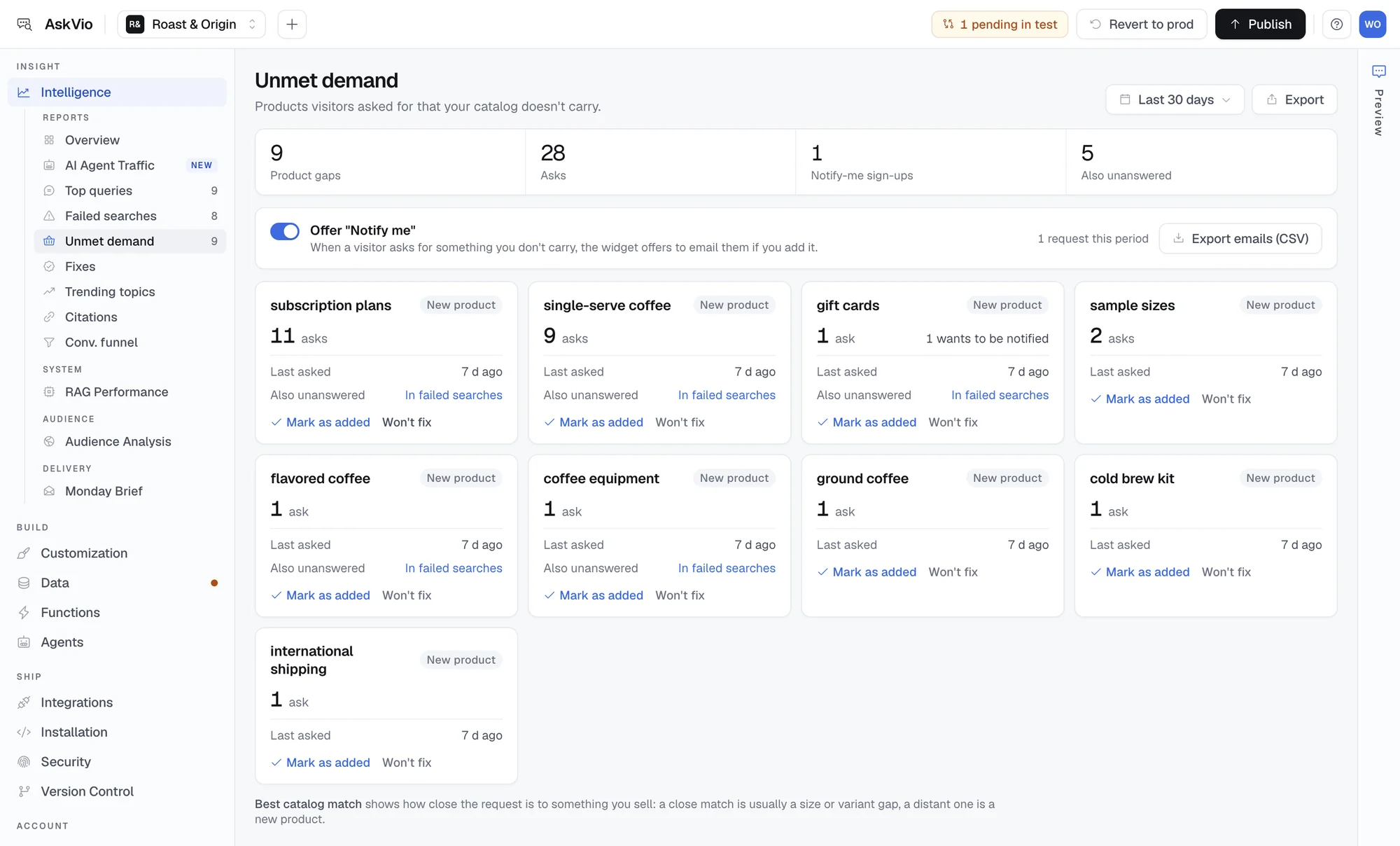
Unmet demand on a demo coffee store: subscription plans and single-serve coffee lead the list.
Trending Topics — early warning for rising FIR
Trending Topics shows week-on-week volume change for query topic clusters. A rising topic that coincides with a cluster in your Failed Searches list is an emerging gap growing faster than you are fixing it. This is the early warning signal to act on before FIR climbs.
Acting on FIR data: a practical workflow
FIR data is only valuable if it generates action. The following workflow is designed for a weekly review cadence — 30 minutes, once a week, produces most of the improvement.
Review the Intelligence Brief (2 min)
Open Intelligence in AskVio and read the Intelligence Brief for the past 7 days. Note the overall FIR percentage and the top two clusters. If FIR increased versus the previous period, the brief will highlight what drove the change.
Work through the top 5 failed searches (10 min)
Sort the Failed Searches table by volume (highest first). For each of the top 5 rows: check whether the content exists on your site. If missing, add it — a FAQ entry in AskVio's Data section takes under 5 minutes. Trigger a recrawl after adding three or more entries.
Screenshot the top 3 Unmet Demand cards and send to the product team (5 min)
Do not try to action catalog gaps yourself — escalate them with the data. A screenshot of the Unmet Demand card, showing query volume and visitor count, is a stronger business case than a verbal request. Include the top similarity score to show how close the existing catalog is from what users want.
Check Trending Topics for new emerging clusters (3 min)
Look at what is rising fastest this week. Cross-reference against Failed Searches — if the same topic appears in both, it is a growing gap that needs priority attention. If the rising topic is not in Failed Searches, users are asking about something new and getting good answers.
Record FIR in your KPI log (2 min)
Paste the overall FIR percentage into a spreadsheet or your team's reporting tool alongside the date. Track it weekly. FIR improvement is often slow and non-linear — a content fix today may not register in the metric for 7–10 days as new conversations accumulate.
What good looks like after 60 days: Teams that follow this workflow consistently typically see FIR drop from 35–45% (common on a freshly deployed widget) to under 15% within two months. The biggest gains come in the first two weeks — the content gaps that generated the most failures are usually obvious and fast to fix.
For agencies: FIR as a client deliverable
If you manage AI chat for multiple client sites, FIR is the metric that most directly justifies your retainer. Every other metric in the analytics stack describes the widget's operational performance. FIR describes what your work is doing for the client's business.
Here is what a monthly FIR-led client report looks like in practice:
This report takes under 10 minutes to assemble from AskVio's dashboard. It contains three things the client cannot get from any other source: the exact questions their customers asked this month, which ones went unanswered, and what product demand is going unmet.
For agency positioning, the framing matters. You are not delivering "chatbot analytics." You are delivering a monthly customer intelligence briefing. The widget is the collection mechanism. The report is the product.
A note on plan access: Failed Searches, Unmet Demand and the Intelligence Brief are available on every AskVio plan, including Free. The Agency plan at $249/month supports up to 15 client sites — each with its own FIR data and intelligence view. If you manage multiple clients and plan to use FIR as a standard monthly deliverable, the Agency plan provides the most cost-effective path, and its Monday Brief email adds week-over-week trends for each site.
A note for MeasureCamp attendees
If you have found this post via MeasureCamp LA 2026, the core argument of this piece is what we will be discussing in the session. Key points worth pressure-testing in the room:
- FIR and bounce rate are not substitutes. Bounce rate measures exit behavior. FIR measures intent failure. A page can have a low bounce rate and a high FIR if users get an answer and leave satisfied — or a high FIR because users failed to get an answer and gave up before bouncing. The metrics are independent.
- FIR is already measurable on any site with an AI chat widget. You do not need custom instrumentation. If the widget logs conversations and confidence scores, you already have the raw data.
- The biggest objection is the denominator. FIR is only as meaningful as your query volume. On a low-traffic site with 50 queries per week, a 10% FIR represents 5 failed queries — statistically fragile. The metric becomes robust above roughly 300 queries per week. Below that threshold, focus on the absolute counts, not the percentage.
- FIR can be pushed into GA4. You can fire a custom event (
failed_intent) from the widget whenever the AI returns a low-confidence answer. This lets you join FIR data with your existing GA4 segments, funnels, and audiences. We will walk through this integration in the session.
Conclusion
Failed Intent Rate fills a structural gap in behavioral analytics. It measures the space between what your visitors wanted and what your site delivered — a space that GA4, heatmaps, and exit surveys cannot see. It is actionable at the content level, at the catalog level, and as a client-facing deliverable for agencies.
The measurement community has spent years making behavioral data more accurate, more granular, and more privacy-compliant. FIR is the natural next frontier: bringing intent data — the dimension behavioral tools structurally cannot capture — into the same rigorous, quantified, time-series measurement framework that the rest of analytics uses.
Those unexplained exits are trying to tell you something. FIR is how you listen.
See your own Failed Intent Rate
AskVio surfaces FIR automatically — no custom instrumentation, no data pipelines. Add the widget, let conversations accumulate, and your analytics dashboard fills in the gaps your GA4 never could.